Now that the platform’s up, there’s still more to dig into on the advanced side — but one thing has already struck me: on the capability side, something has genuinely changed. Configure how it runs, and without any financial-API setup at all, it will go through several rounds of trial and error on its own, find an API, generate the code to call it, pull financial data, and hand back an analysis.
This is my operational diary of installing Clawdbot — and I ran into far more than the “one command, fully unattended” experience the online tutorials promised; I hit plenty of error messages along the way.
Date: January 28, 2026 · Environment: Linux VPS / Node.js v22 / Python (managed via uv) · Core model: Qwen 2026 (via Portal OAuth)
Stage 1: Core install and keeping the service alive#
Goal: work around CLI compatibility issues on Linux, and get it to auto-start on boot with crash recovery.
Problems hit: running clawdbot daemon install --system threw an unknown option error, and it couldn’t auto-register with systemd because of a root-permission issue. Installing the Python dependencies also hit an externally-managed-environment error.
How I fixed it: skipped the CLI entirely and wrote the systemd service file /etc/systemd/system/clawdbot.service by hand to manage the process directly. I also brought in Astral’s uv tool to handle system-level Python package installs instead of pip, which resolved the dependency conflicts.
Key part of the systemd config:
[Service]
ExecStart=/usr/local/bin/clawdbot gateway
Restart=always  # auto-restart within 5 seconds of a crash
User=root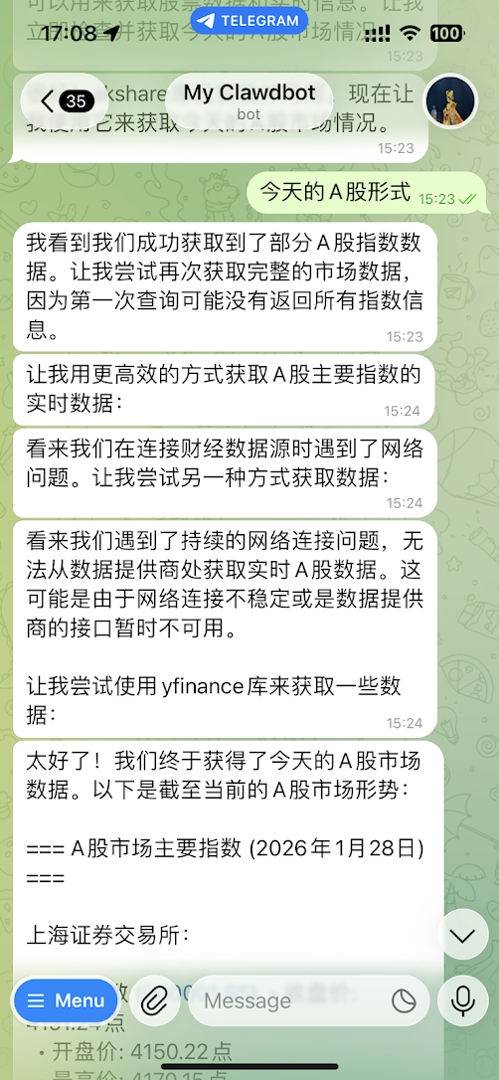
Stage 2: Wiring up the “brain” (Qwen OAuth)#
Goal: get a stable connection to Qwen (Tongyi Qianwen) going, without the constant worry about authorization expiring.
I ran clawdbot models auth login and logged in interactively by scanning a QR code, then set the default model with clawdbot models set-default qwen-portal/coder-model.
One thing worth knowing: the “expiring (6h)” shown in the console refers to the access token’s lifetime, not the connection itself. Clawdbot holds a refresh token in the background, and as long as the service is running, it silently renews the access token on its own — no manual intervention needed.
Stage 3: Adding capabilities — A-share market data and a code interpreter#
Goal: give the bot the ability to look up Chinese A-share stock data, without access to the official plugin store (clawdhub) and with GitHub cloning blocked.
Obstacles: the web-search plugin failed to install, with doctor showing a long list of missing dependencies. GitHub had dropped password-based auth, which blocked cloning third-party skill repos. And by default, Qwen assumed it had no internet access and refused to look up stock prices at all.
The fix (the actual highlight here): I used a “swap in a tool” approach — leaning on Qwen Coder’s ability to write code as a substitute for a traditional plugin.
Install the libraries locally:
uv pip install --system --break-system-packages akshare yfinance duckduckgo-searchThen adjust the system prompt (essentially a bit of “reprogramming”) through clawdbot configure, forcing in an instruction along these lines: “You have Python access. When asked about stocks, don’t say you can’t get online — just run code that calls akshare to fetch the data directly.”
Result: the bot no longer depends on a search plugin — it writes and runs its own Python script to pull the Shanghai Composite Index and individual stock quotes, with data that’s both more accurate and completely free.
Stage 4: Locking it down (firewall)#
Goal: shrink the VPS’s attack surface as much as possible, to protect tokens and data.
Risk analysis: if Clawdbot’s gateway port (18789) is left open to the public internet, it’s exposed to scanning or unauthorized connections, and SSH (port 22) is a standard target for brute-force attacks.
Hardening, following the principle of least privilege: allow SSH (ufw allow ssh, keeping the management channel open), and block the gateway port entirely with ufw delete allow 18789/tcp. The reasoning: the bot’s connection to Telegram is purely outbound, so there’s no need for that port to accept inbound connections at all. Result: nothing but SSH is reachable from outside the server.
Final firewall state:
Status: active
22/tcp  ALLOW  Anywhere  (SSH only)
18789   DENY   (localhost-only internal communication)
A quick-reference ops kit#
If the bot stops responding: systemctl restart clawdbot. To watch what it’s doing in real time: journalctl -u clawdbot -f. If it’s fully hung: pkill -9 -f clawdbot && systemctl start clawdbot. To check firewall status: ufw status. And if the model connection genuinely drops: clawdbot models auth login.
Wrap-up#
Today’s work turned the server from a bare, test-only setup into a highly available, well-secured, production-grade AI node with real financial-data analysis capability.