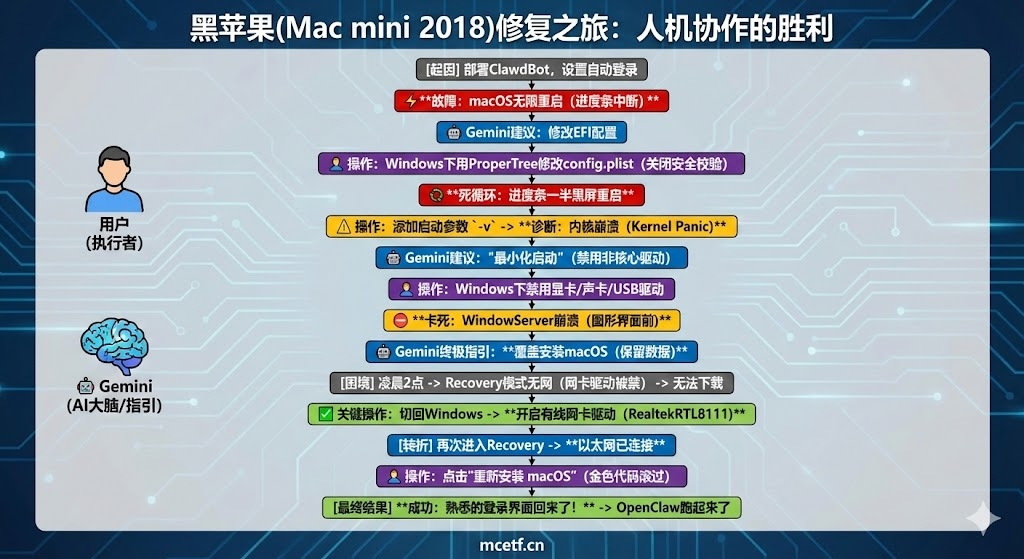
Couldn’t resist the urge this weekend to deploy ClawdBot on macOS, so I dug out an old hackintosh build I’d put together years ago (a Mac mini 2018 with an i7-8700B). The install itself went smoothly, but since this needed to run as a long-lived server, I figured it needed to auto-restart after a power loss and auto-login after boot — so I made two changes: set macOS as the priority boot target, and enabled auto-login for the user account.
The second change turned out to be fatal — it left macOS completely unable to reach the desktop.
Chasing the fix with Gemini#
Following a plan Gemini worked out with me, I started troubleshooting. The first step went smoothly: booting into Windows, mounting the EFI partition with ProperTree, and editing config.plist to disable secure boot verification, per its guidance.
After restarting, it got into the macOS boot loader — I thought that had fixed it, until the progress bar got halfway and the machine went black and restarted, over and over.
The real challenge: an infinite reboot loop. To track down the cause, I added -v to the boot arguments to see the verbose log. I figured, like in the old days, I’d just read the log and find the culprit — reality wasn’t that kind. The scrolling code did catch a kernel panic, but the machine stayed stuck in an endless restart regardless.
AI-guided “blind” troubleshooting: Gemini vs. ChatGPT. Worth mentioning — Gemini and ChatGPT gave completely different approaches to fixing this. Given how much I’d come to trust Gemini’s reasoning lately, I went with its plan.
Gemini’s approach was “minimal boot” — disabling every non-essential driver under Windows (graphics, audio, custom USB, etc.), keeping only the bare minimum needed to boot. After a few rounds of this, the boot process did get further — the earlier kernel panic was gone — but it still hung right before the graphics interface loaded (a WindowServer crash).
By this point it was past 2 a.m.
The last resort: reinstall while keeping my data. With several rounds of fixes producing nothing real, Gemini’s final suggestion was a reinstall. As a hackintosh user, the word “reinstall” doesn’t exactly inspire confidence — beyond worrying whether the boot files would get overwritten, driver compatibility alone is enough of a headache. But by this point in the night, the only goal left was getting it working so I could go to sleep.
That’s where I hit a small snag: Gemini told me to boot into Recovery mode and reinstall from there, but because I’d disabled the network driver earlier as part of “minimal boot,” Recovery mode had no network to actually download the OS with. A neat little dead end: no network → can’t download the OS → can’t boot the OS → can’t fix the driver.
Still had a plan, though — I switched back to Windows and turned the wired network driver (RealtekRTL8111) back on by itself. Back into Recovery, and this time the ethernet icon in the top corner finally lit up.
With the fans humming in the case (or possibly just tinnitus from how quiet 2 a.m. gets), I clicked “Reinstall macOS.” Thankfully, that operation only refreshes the core system files — it doesn’t touch your data.
Right before I fully passed out, a line of gold text finally scrolled across the screen, and that familiar login screen was back.
A thought on all this: are technical forums dying in the age of large models?#
A quick reflection on the whole ordeal. With large models backing you up, the old role technical forums used to play feels like it’s basically disappearing. Back in the day, troubleshooting a hackintosh meant: hit an error → search forums for the keywords → dig through years-old posts looking for a similar setup → try someone else’s EFI → fail, repeat. You had to do a lot of mentally exhausting matching between someone else’s fix and your own situation.
Now the pattern is: hit an error → snap a photo, hand it to the model → get the next step generated directly.
Through the whole process, I never really understood the reasoning behind every line of code — I was more of an executor. The model was the brain, and I was just its hands. As long as it was pointed in the right direction, solving the problem was just a matter of time. That’s efficient, but it also leaves this nagging feeling that we’re drifting further away from being a “hardcore tinkerer” in the old sense.
Postscript#
The macOS version of OpenClaw is finally up and running. I’m now running two Claw-based assistants: one doing real-time monitoring as a formal, production-style task — basically my ops person — and the other handling development and testing. Between the two, they’re now helping carry my own thinking and decisions.