There’s more and more discussion about OpenClaw lately — is this “little crawfish” actually worth installing? Based on my time with it, here’s my honest take.
I got in early, back when it was still called ClawdBot, and I’ve kept using and upgrading it through the name change and every version bump, all the way to the current 3.8.
After using it for a while, I’ve found it genuinely valuable in a few specific areas.
1. Memory#
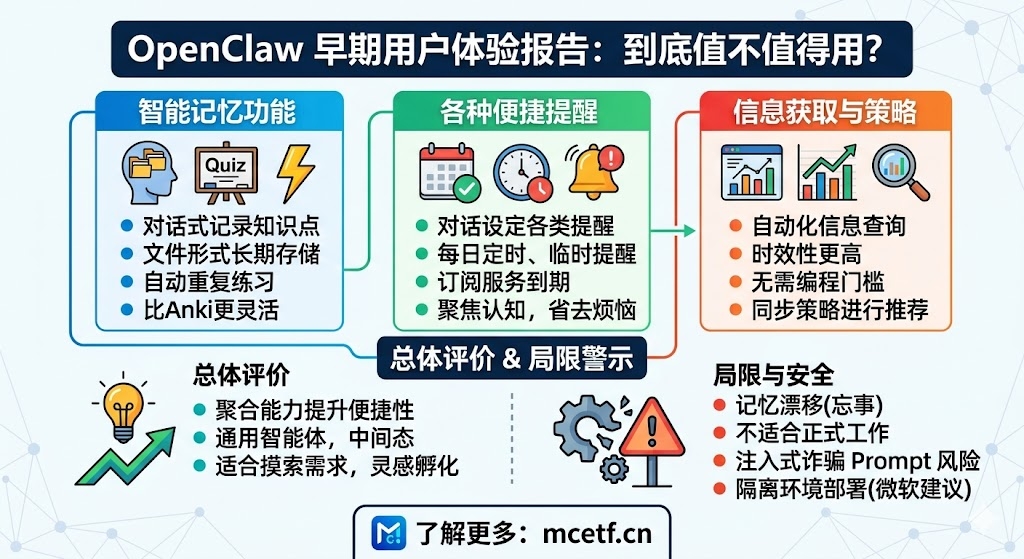
Normally, when a conversation with a large model runs long, it starts losing earlier context — and I don’t just mean dozens of exchanges in a single day, I mean the accumulated total over weeks and months. OpenClaw handles this reasonably well: it remembers every task you give it and stores it as a file.
My main use case is learning — both general knowledge and foreign languages. When I hit something I can’t quite retain while going through a course, I just toss it over (through Telegram, for instance) and have it added to a quiz set. I’ve set up rules so it repeats practice based on my right/wrong ratio, effectively turning it into a practice tool I can use anywhere, anytime.
Anki does something similar with spaced repetition, but OpenClaw’s advantage is that adding content is dead simple — just describe a fact in plain language and it gets added, no need to format it into Anki’s specific card structure. The learning and practice rules can also be adjusted on the fly.
2. Reminders#
This is my second-most-used feature — mainly as a daily-assistant style reminder system: recurring daily reminders, one-off event reminders, renewal reminders for various subscriptions, and so on.
It’s simple to use — set the reminder through conversation, and once the task is done, the system logs it automatically, so I can look back later and clearly see whether I hit each day’s tasks on time.
If you rely on your own memory for these things, the attention cost is far higher than the cost of actually doing them. OpenClaw turns them into something that just runs automatically in the background — no need to think through reminder rules or trigger conditions, just describe it in plain language and it handles the rest. Reminders here are really just a more convenient path that saves time and lets you focus your actual attention on things that genuinely need it.
There are similar apps out there, but they either come with cluttered ads or a subscription fee, and the experience is nowhere near as direct as what OpenClaw offers. I also set up automatic mailbox checking, but honestly it hasn’t turned out very useful — I barely use that part.
3. Information gathering and investing#
We can look things up anytime, but not always at the right moment — I can’t be constantly checking some specific piece of information myself, and OpenClaw’s automated lookups have a real edge here.
On the investing side, OpenClaw actually solves an access problem. A lot of people assume this kind of system is only usable by people who can code, but I’d argue it’s better understood as a “middle layer.” As I mentioned in an earlier post, I used it to build a dynamic-rebalancing system for my stock investments, and to build out a website. For people who don’t have the time or energy to dig into building features from scratch, but just want to use something for a bit, that “middle-ground” capability is genuinely well suited: you can just tell it your investment strategy directly. The difference from a plain Q&A session is that you first sync your strategy’s key points with it, and then the system pulls live data aligned with that strategy and gives you recommendations based on it. This is a general-purpose capability, stronger than a typical Q&A system, able to string every step of the process together.
Wrap-up#
The value is in the application, not the technical novelty. OpenClaw’s value isn’t some breakthrough in the underlying technology — it’s that, as a new kind of application, it bundles a bunch of capabilities together and makes them simple and convenient. Market adoption usually doesn’t hinge on how cutting-edge a technology is, but on whether it genuinely makes things more convenient.
A general-purpose agent, well suited as a middle step. You could say it doesn’t do any one thing perfectly, but it does a bit of everything. As an intermediate step, with little learning cost or time investment, you can use conversation to explore what you actually need, and once things are clearer, harden the result into a real product using Codex or Claude Code.
Valuable, but don’t oversell it. Treating it like your own “personal cognitive extension” or “AI consciousness” is going too far. There’s still a real problem with memory loss — or “drift” — where a rule you’d settled on will just get forgotten at some point, and it’ll invent a different one out of nowhere. So using it directly for anything that needs to be formal or authoritative isn’t realistic. Even daily reminders sometimes get “forgotten.” So it’s fine to treat it as a personal companion or tutor, but it’s not quite ready to be a work assistant.
Watch the security risks. People have already been hit by “AI scams” tied to this — there are injection-style scam prompts circulating online specifically targeting OpenClaw. So: don’t run it on a machine you use for anything formal, and don’t grant it permissions beyond what you’re comfortable with it having. Microsoft’s security team’s own advice is that OpenClaw isn’t suited for a standard personal or enterprise workstation, and should only be deployed in a fully isolated environment.