I deployed a self-hosted immersive translation system built on the Qwen3 4B small model locally, and ended up with an AI translation experience I can use without any usage caps.
Why Qwen3 4B?#
Compared to the larger model variants, Qwen3 4B strikes a decent balance between reasoning ability and resource use. It runs smoothly on an ordinary consumer GPU or even a reasonably powerful VPS, which makes it a good fit for anyone who wants to self-host their own private translation service.
Installing Ollama and Open WebUI#
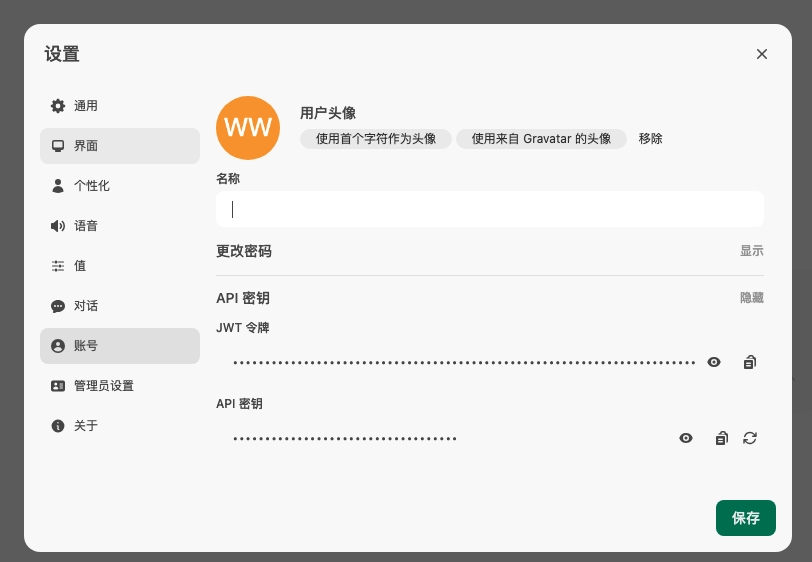
I won’t go through the install process in detail here — pull the qwen3:4b model, then grab an API key from inside Open WebUI.
Configuring Immersive Translate#
Point Immersive Translate at a custom API endpoint.
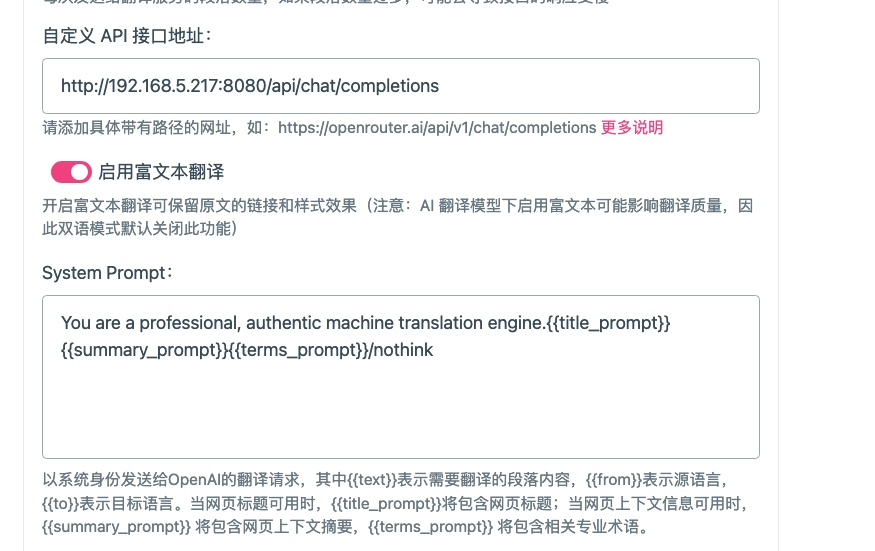
Speeding up translation: adding the keyword nothink to the translation prompt meaningfully cuts down the model’s “thinking” time and speeds up responses — especially noticeable with immersive, sentence-by-sentence translation. The keyword itself doesn’t change the semantics of the translation, it just nudges the model toward translating directly rather than reasoning its way there.