I’d never been happy with how weak macOS’s native input method is at word prediction, and I wasn’t thrilled about putting up with the bloat and privacy trade-offs of some of the big commercial input methods either, so I kept looking for the “perfect” replacement.
I recently finally got Squirrel (鼠须管) properly set up, paired with Rime-Ice (雾凇拼音) — a scheme with an excellent reputation in the community right now.
After using it for a while, I have to say: this combination is genuinely great.
Why bother with Rime?#
Rime (the Rime Input Method Engine) has always had legendary status in more technical circles. Its strengths are obvious:
- Genuine privacy — fully open source, fully local, never uploads user data anywhere.
- A very high ceiling — deeply customizable, you can shape it however you want.
- Very fast response — lightweight, with essentially no lag.
But its drawbacks used to be just as off-putting: the barrier to entry was steep. Installing Rime used to feel like getting a computer with no OS on it — you had to write your own config files (YAML) and go find your own dictionary. For an average user, that’s a nightmare.
Then I found Rime-Ice.
What does Rime-Ice actually change?#
If Squirrel/Rime is a powerful game engine, Rime-Ice is a beautifully optimized AAA game built on top of it.
Rime-Ice is an actively maintained open-source config scheme on GitHub. The author keeps the dictionary continuously updated, covering both everyday language and a large amount of current internet slang. Its real significance is that it turns Rime into a modern, out-of-the-box input method.
With this combination now set up, the improvements I’ve actually noticed are:
1. A genuinely smooth typing feel. This is the most noticeable part. Squirrel is written in native code, and on macOS it’s extremely smooth — no stutter at all. That precise, responsive feel is something a lot of input methods built on Electron or other frameworks just can’t match.
2. A local dictionary that actually keeps up. The biggest pain point with plain Rime used to be a dictionary that felt outdated. With Rime-Ice layered on, since it maintains a huge dictionary pulling from sources like Wikipedia and Moegirlpedia, the hit rate is impressively high whether I’m typing long sentences or current slang. Its whole-sentence smart correction is genuinely useful too — it can fix a mistyped pinyin sequence on the fly, so typing speed doesn’t suffer just because it’s a “local” input method.
3. Rich features and good looks. Rime-Ice comes bundled with a lot of practical features, so I don’t have to dig through config files myself: selecting a single character out of a longer word with bracket keys, quick shortcuts for emoji and symbols, and automatic spacing between Chinese and English text — a small detail, but a genuine relief if that kind of thing bothers you.
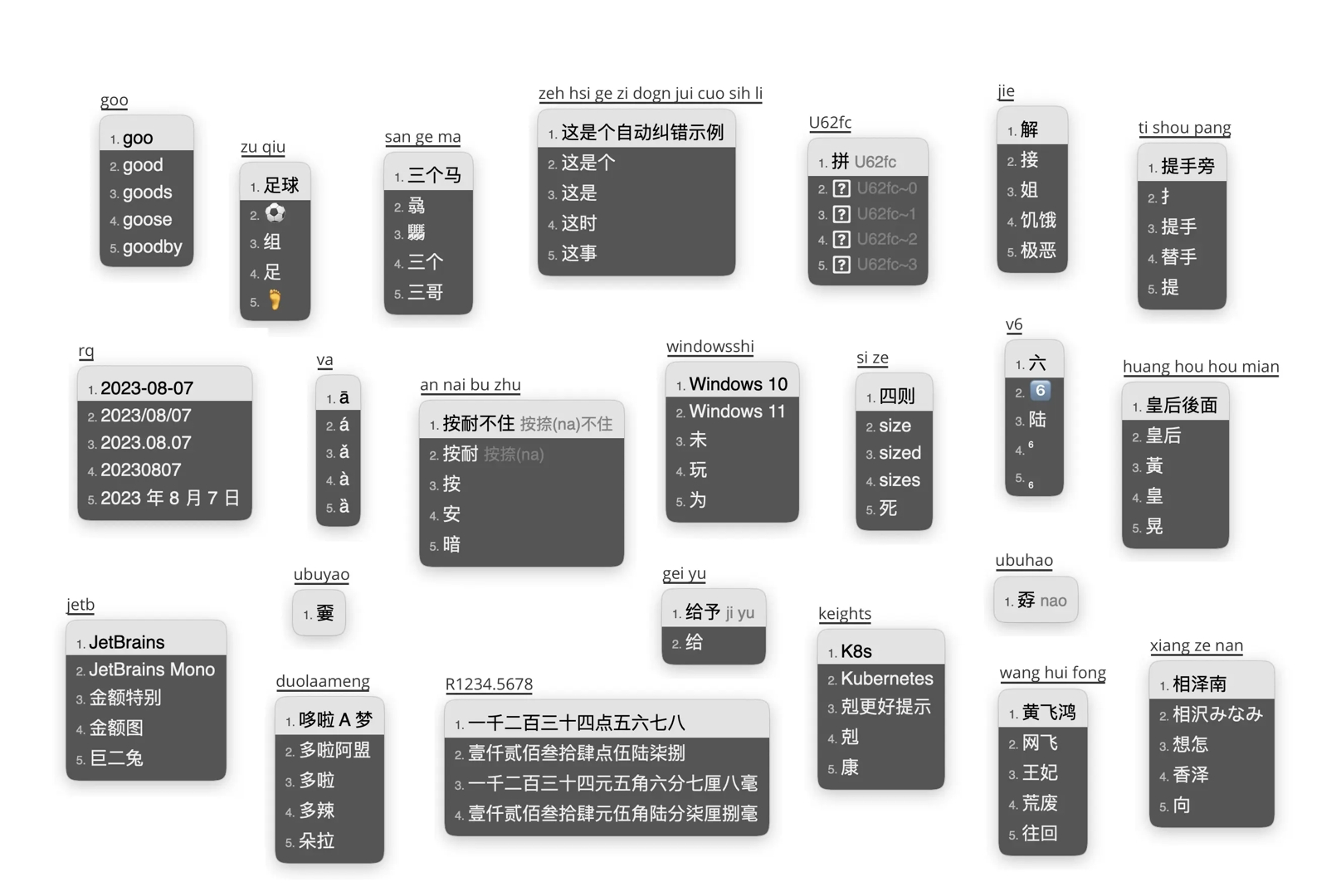
Paired with a skin either bundled with Squirrel or made by the community, the input interface now looks clean and modern — every bit as polished as any commercial input method.